SERP Analysis Tool & SERP Analyzer for Smarter SEO Decisions.
Enter a target keyword and page URL to analyze the SERP, understand search intent, compare ranking page patterns, find content gaps, and turn the findings into prioritized SEO missions with JoinRankPilot.
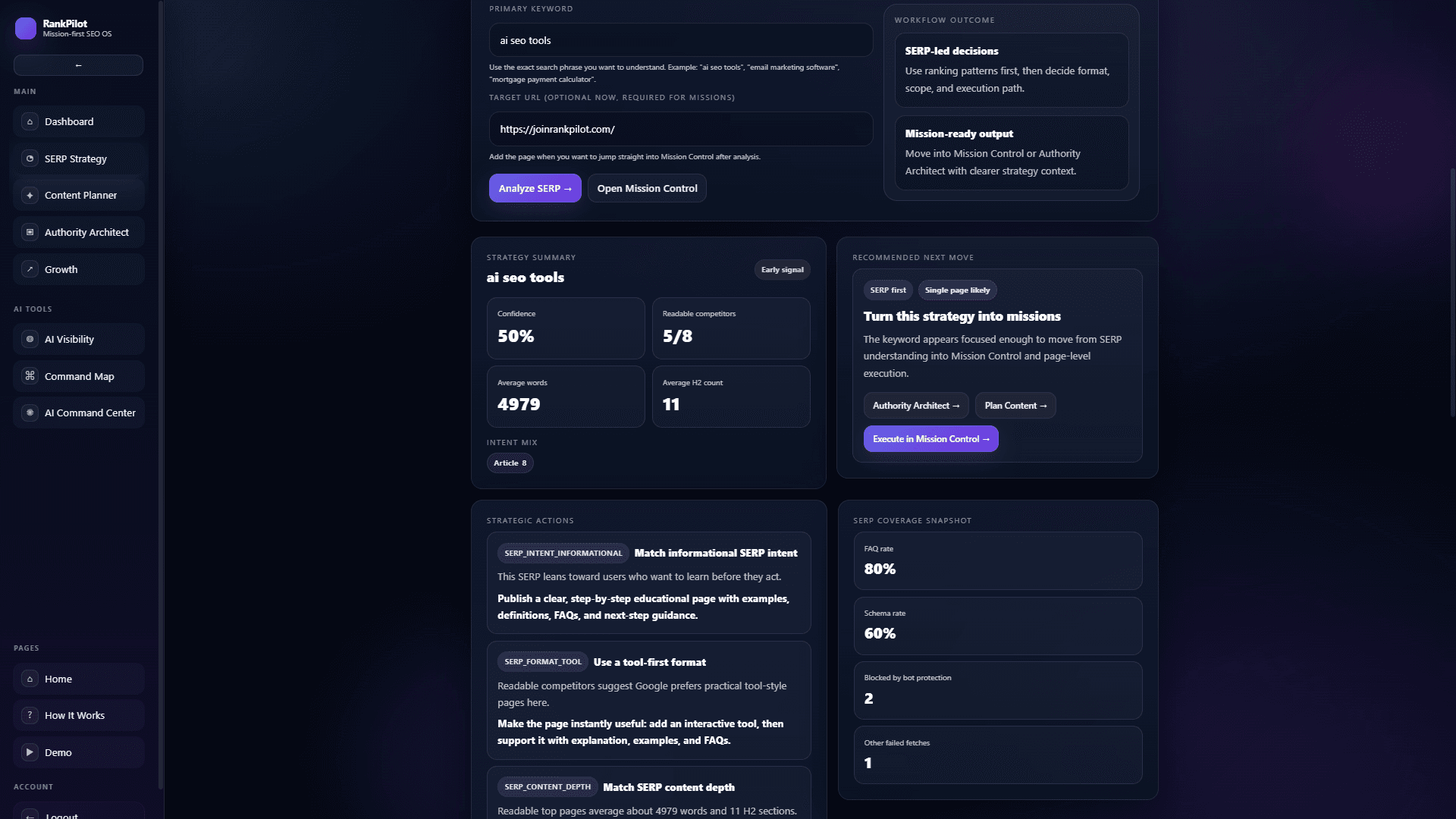
SERP analyzer workflow
Review the keyword, intent mix, ranking competitors, coverage signals, and recommended next move before turning the analysis into missions.
Why SERP analysis matters
The SERP tells you what kind of page deserves to rank.
SERP analysis is the process of studying Google search results to understand the content format, intent, depth, and user expectations behind a keyword.
A strong SERP analysis tool should do more than list ranking URLs. It should help you decide whether to build a guide, comparison, tool page, landing page, content hub, or supporting asset before you invest time in execution.
SERP analysis workflow
How the JoinRankPilot SERP analyzer turns results into actions
This tool workflow keeps the analysis focused on the signals needed for a ranking decision. For the full educational process, read the step-by-step SERP analysis guide.
Intent
Read the real SERP
Check what Google ranks now: guides, tools, lists, landing pages, videos, local results, or mixed formats.
Pattern
Compare the winners
Study headings, depth, page structure, examples, FAQs, internal links, and proof across top competitors.
Gap
Find the missing angle
Identify what your page must add, clarify, restructure, or support before it can compete.
Action
Turn insight into work
Move from research into a prioritized mission: update the page, expand content, or build supporting assets.
What to analyze
The signals that turn Google results into a plan
Search intent
Decide whether the searcher wants to learn, compare, buy, use a tool, or solve a specific problem.
Page format
Check whether top results are articles, tool pages, product pages, category pages, lists, or comparisons.
Content depth
Look for repeated subtopics, examples, FAQs, decision criteria, screenshots, templates, and missing sections.
Competitive angle
Find where a stronger page can be clearer, more useful, better structured, or better connected internally.
Practical use cases
When to use SERP analysis before editing a page
The best time to analyze the SERP is before a team changes copy, creates a new article, or decides that a page only needs more keywords. These use cases show how the review changes the next SEO action.
Refreshing a page stuck on page two
Compare the current page against the results that are actually ranking. If the winners answer more specific questions, include clearer examples, stronger FAQs, or a better internal-link path before rewriting the whole page.
Choosing between a tool page and a guide
When the SERP ranks both tools and guides, use the tool page as the action hub and create a supporting guide for education-heavy questions. Link between them only where the next step is genuinely useful.
Planning a content cluster
Use repeated competitor sections, People Also Ask questions, and missing subtopics to decide which support pages should exist around the main keyword instead of adding every topic to one long page.
Prioritizing SEO work for a team
Translate findings into a short mission list: update the H1 or intro, add a worked example, clarify comparison criteria, add internal links, create a support page, then validate the page again.
Connected SEO workflows
Turn SERP findings into the next SEO action
A SERP analysis tool is most useful when the findings lead to a clear next step. JoinRankPilot helps teams turn search intent, competitor patterns, and missing subtopics into content briefs, supporting pages, and prioritized SEO missions.
Plan content from SERP gaps
Use SERP findings to decide which sections, FAQs, briefs, and support pages need to exist before production starts.
Open workflow →
Build topical support around the page
Turn repeated SERP themes into connected supporting pages so the hub is backed by clear topical depth.
Open workflow →
Convert findings into SEO missions
Move from analysis to execution with prioritized missions for headings, content depth, internal links, and validation.
Open workflow →
Next actions from SERP findings
Use each SERP finding to choose the right next step
Different SERP findings call for different actions. Use the paths below to clarify search intent, turn content gaps into a brief, review competitor page formats, or convert the analysis into prioritized SEO work.
Search intent analysis
Create this support article when the SERP shows several result types and the team needs a repeatable way to choose the right page format before writing.
turn intent patterns into a content brief →SERP feature review
Use this support angle when featured snippets, People Also Ask, videos, or local results change what the page needs to answer first.
connect SERP features to AI SEO actions →Competitor page format audit
Use this supporting guide to compare ranking pages by structure, depth, proof, examples, and internal-link coverage without copying competitors.
build topical support around competitor gaps →SERP gap execution checklist
Use this checklist when the analysis is complete and the next step is assigning page updates, supporting content, internal links, and validation work.
convert SERP gaps into SEO missions →Continue the workflow
Move from SERP analysis to planning and execution
Choose the next workflow based on what the SERP reveals: clarify intent, create a content brief, turn findings into an SEO mission, or show the analysis process to your team.
Search intent analysis guide
Use the command center workflow when the SERP shows mixed intent and the team needs to decide whether the next asset should teach, compare, convert, or support another page.
Continue →
SERP gap to content brief
Move from competitor gaps into a practical content brief with the missing sections, examples, FAQs, and internal-link targets the page needs before publishing.
Continue →
Mission-first SEO execution
Turn SERP findings into the JoinRankPilot workflow: analyze the URL and keyword, choose the right mission, execute the update, then validate the page again.
Continue →
SERP analysis demo path
Show stakeholders how a SERP review becomes a ranked action plan instead of a static research report or disconnected spreadsheet.
Continue →
SERP checklist
Before you create or update the page
Use this checklist to keep analysis practical. The goal is not to copy competitors. The goal is to understand the pattern Google rewards, then build a more useful page.
SERP examples
What SERP analysis changes in the real workflow
Tool keyword
For a keyword like SERP analysis tool, check whether Google rewards product pages, tool pages, educational guides, or mixed results. Then shape the page around practical analysis steps, examples, and a clear path from insight to action.
Commercial keyword
If top pages are comparison lists, a thin product landing page may miss intent. Build decision support, pros and cons, examples, and a clear recommendation path.
Beginner keyword
If results are definition-heavy guides, lead with plain-language explanations, steps, examples, FAQs, and schema-friendly answers before asking for action.
Mixed-intent SERP
When Google ranks tools, guides, videos, and product pages together, match the dominant pattern while covering secondary intent without making the page unfocused.
Authority-heavy results
When large sites dominate, choose a narrower angle, add stronger topical support, and target long-tail opportunities before competing head-on.
Worked SERP reviews
Example outputs a user should get from the analysis
Keyword: SERP analysis tool
SERP pattern
Tool pages, SEO software pages, and educational guides can all appear because users may want either a product workflow or a how-to explanation.
Interpretation
The page should clearly describe the tool use case, explain how to read SERP signals, and show examples of turning findings into SEO actions.
Recommended action
Keep the product intent visible, then add examples, edge cases, FAQs, and links to content planning or mission workflows so the page covers both evaluation and execution intent.
Keyword: how to analyze a SERP
SERP pattern
The results usually lean educational, with step-by-step guides, checklists, definitions, and beginner-friendly explanations.
Interpretation
A pure product page may feel too commercial for this query, even if the software can solve the problem.
Recommended action
Create or link to a supporting guide that teaches the process, then route readers back to the tool when they are ready to apply the checklist to a real page.
Keyword: SERP competitor analysis
SERP pattern
Searchers often expect comparison criteria: ranking formats, headings, content depth, proof, SERP features, and what each competitor is missing.
Interpretation
The useful output is not a copied competitor outline; it is a decision about what your page should do differently.
Recommended action
Add a competitor-format audit, identify gaps, then convert the findings into page updates, supporting content, and internal-link missions.
SERP edge cases
When the results page sends mixed signals
Not every keyword has a clean pattern. Use these cases to decide whether the page needs a focused update, a supporting guide, or a different mission before investing in more content.
Local pack appears above organic results
When maps, reviews, and location pages dominate the top of the SERP, treat the keyword as partly local even if it looks informational. A national guide may need local context, service-area links, or a different target keyword.
SERP features answer the query quickly
If snippets, People Also Ask, videos, or calculators satisfy part of the search, the page should answer the simple question fast and then add deeper examples, decision criteria, or workflow guidance that the SERP feature cannot cover.
The ranking format does not match your asset
If Google ranks tutorials and your page is a sales page, do not force the sales page to act like a guide. Build or link to the supporting asset that matches the intent, then connect it naturally back to the product workflow.
The SERP shifts after an update
When the top results change from tools to guides, from guides to lists, or from national to local results, re-check the mission before editing. The right action may be a new support page instead of more copy on the current page.
Common mistakes
What to avoid when turning SERP data into actions
JoinRankPilot difference
From SERP research to a guided SEO mission.
JoinRankPilot connects SERP analysis with content planning, topical support, and guided execution so users are not left with disconnected research notes.
Input
URL + target keyword
Analysis
Intent, page format, competitor gaps
Mission
Prioritized SEO action with a clear reason
Validation
Check progress before expanding
Related tools
Use SERP analysis as the start of the workflow
How to Do SERP Analysis
Follow a step-by-step guide for checking intent, competitors, gaps, and next actions.
Explore →
AI SEO Ranking Tool
Turn low visibility and ranking signals into a practical action plan.
Explore →
SEO Copilot
Use a connected workflow for SERP analysis, content planning, and SEO missions.
Explore →
SEO Content Planner
Turn SERP gaps into sections, briefs, FAQs, and supporting content.
Explore →
Topical Authority SEO
Build the supporting pages and internal links that strengthen the target page.
Explore →
SEO Mission Tool
Convert analysis into prioritized actions users can execute and validate.
Explore →
FAQ about SERP analysis
What is a SERP analysis tool?
A SERP analysis tool helps you study Google results so you can understand intent, ranking patterns, competitor formats, content gaps, and the next SEO actions for a page.
What does the JoinRankPilot SERP analyzer examine?
JoinRankPilot examines the target keyword, search intent, ranking page formats, competitor patterns, content depth, SERP coverage, and gaps that can be turned into prioritized SEO actions.
Is SERP analysis only for blog content?
No. SERP analysis helps with landing pages, service pages, tool pages, comparison pages, ecommerce categories, content hubs, and any page that needs to match search intent.
What should I do after SERP analysis?
Use the findings to update the page type, title, headings, depth, internal links, examples, FAQs, and supporting content. The goal is execution, not just research.
What mistakes should I avoid during SERP analysis?
Avoid copying competitors, ignoring mixed intent, using word count as the main goal, missing SERP features, or finishing the review without a specific content, internal-link, or validation action.
How often should I re-check a SERP?
Re-check the SERP before major page updates, after rankings change, when new SERP features appear, or when the top results begin showing a different intent pattern than your current page targets.
How do I know whether to update an existing page or create a new one?
Update the existing page when it already matches the dominant intent but misses examples, FAQs, proof, or internal links. Create a supporting page when the SERP shows a different intent, such as a beginner guide, comparison, checklist, or use-case article.
Does SERP analysis mean matching competitor word count?
No. Word count is only a weak signal. A better SERP review checks intent, page type, repeated subtopics, examples, proof, SERP features, and the actions users need after reading the page.
What should a SERP analysis report include?
A useful report should include the dominant intent, ranking page formats, SERP features, competitor patterns, missing subtopics, internal-link opportunities, recommended content updates, and validation steps.
What makes JoinRankPilot different?
JoinRankPilot connects SERP analysis to content planning, topical support, and guided SEO missions so users know what to fix first and how to validate progress.
Next step
Turn SERP analysis into a page people can actually rank.
Start with one URL and one keyword. See what the SERP is asking for, then move into guided SEO actions with JoinRankPilot.