The short answer
A page is usually missing from Google for one of three reasons: something on your site blocks it (a noindex tag, a robots.txt rule, a canonical pointing elsewhere or an error code), Google has not crawled it yet because it is new or poorly linked, or Google crawled it and decided it was not useful or different enough to index. Search Console tells you which one.
Check a page in 2 minutes
- Rule out blockers on your side. Paste the address into the free indexing checker. It loads the page like a search engine and checks the status code, redirects, robots.txt, noindex, the canonical tag and whether the page is in your sitemap.
- See what Google says. In Google Search Console, paste the address into the search bar at the top (URL Inspection). The result names the exact status, when Google last crawled the page and which canonical it chose.
- Match the status to the table below and make the fix it suggests.
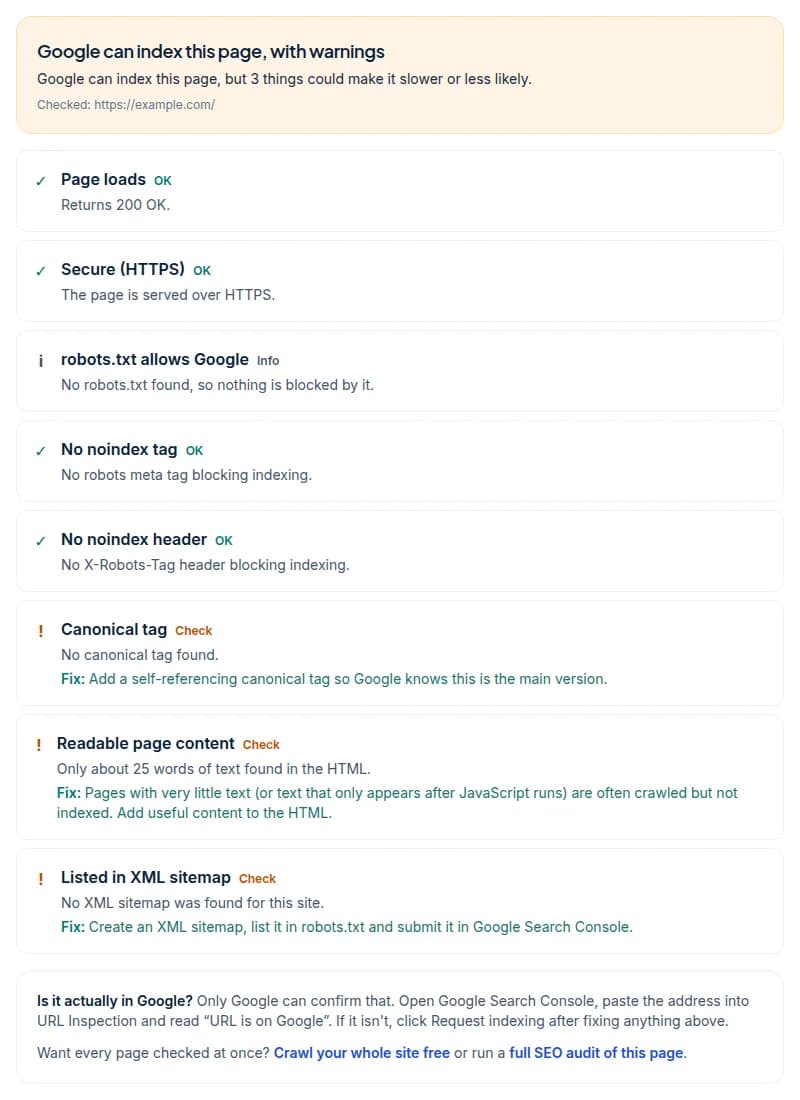
Every Search Console status explained
These are the names Google uses in the Page indexing report and in URL Inspection.
| Status | What it means | What to do |
|---|---|---|
| URL is unknown to Google | Google has never seen the address. | Link to it from a page that is already indexed, make sure it is in your XML sitemap, then request indexing once. |
| Discovered – currently not indexed | Google knows the address but has not crawled it yet. Common on new or slow sites. | Add internal links from important pages, keep it in the sitemap and make sure the server answers quickly. Then wait; repeated requests do not help. |
| Crawled – currently not indexed | Google fetched the page and chose not to index it for now. | Make the page clearly useful and different from your other pages: add the missing answer, merge near-duplicates, link to it from related pages. |
| Excluded by ‘noindex’ tag | A robots meta tag or X-Robots-Tag header says noindex. | Remove the noindex if you want the page in Google (often a plugin or staging setting left on). |
| Blocked by robots.txt | Your robots.txt stops Google crawling the address. | Remove or narrow the Disallow rule. To keep a page out of Google, allow crawling and use noindex instead. |
| Alternate page with proper canonical tag | The page points to another version as the main one, and Google agrees. | Nothing to fix; this is expected for duplicates such as tracking URLs. |
| Duplicate without user-selected canonical | Google thinks the page duplicates another and you have not said which one is main. | Add a canonical tag to the version you want indexed, or make the content distinct. |
| Duplicate, Google chose different canonical than user | Your canonical says one thing; Google picked another. | Make the signals agree: internal links, sitemap and redirects should all point to the same address. |
| Page with redirect | The address redirects somewhere else. | Fine if intended. Update links and the sitemap to the final address. |
| Not found (404) / Soft 404 | The page is missing, or looks empty while returning 200. | Restore or redirect moved pages; return a real 404 for pages that are gone; add real content to thin pages. |
| Server error (5xx) | Your server failed when Google tried to fetch the page. | Check hosting errors and limits; Google retries, but repeated errors slow crawling of the whole site. |
A real example: two of our own pages
When we checked joinrankpilot.com with URL Inspection on 4 November 2026, 23 of the 30 pages in our sitemap were indexed. Two important ones were not:
| Page | Status on 4 Nov 2026 | Why |
|---|---|---|
| /audit | Discovered – currently not indexed | Launched on 2 November. Google had found the address through a link but had not crawled it yet. |
| /website-indexing-checker | URL is unknown to Google | Added on 3 November, one day after Google last read our sitemap (2 November). |
Nothing on the pages was blocking Google: both return 200, have no noindex, point their canonical at themselves and are linked from the menu and footer of every page. They were simply new. So the fix is not to change the pages but to tell Google about them once: resubmit the sitemap, request indexing for each page a single time, and then wait. We will update this guide with what happened.
After you fix it
- Run the indexing checker again until every blocking check passes.
- Request indexing once in Search Console, then check URL Inspection again after a week.
- If a page stays “Discovered” or “Crawled – currently not indexed” for weeks, improve the page and its internal links rather than requesting again.
- Check the rest of your site with the free website crawler (free account), which finds noindex, canonical and redirect problems on every page.
Indexing FAQ
How long does Google take to index a new page?
From a few days to a few weeks. Google's own documentation says crawling can take that long and that requesting indexing again does not make it faster. Internal links from indexed pages and a sitemap entry help Google find the page sooner.
Is a site: search a reliable way to check indexing?
No. A site: search shows a sample and can miss pages that are indexed. URL Inspection in Google Search Console is the reliable check for a single page.
Should I request indexing every day until the page appears?
No. Request it once after you have fixed the cause. Repeating the request does not move the page up the queue.
Why is my page indexed but not getting any traffic?
Being indexed only means the page can appear. To get clicks it also has to rank for searches people make and have a title that earns the click. Check its queries and positions in Search Console's Performance report.
Does this indexing checker need an account?
No. The JoinRankPilot indexing checker is free and needs no sign-up. It checks everything on your side that can block indexing; only Search Console can confirm the status inside Google.